Content Pruning for SEO: When to Delete, Merge, or Redirect Content
Published: June 1, 2026 | Last updated: June 1, 2026 | 12 min read

Most SEO problems are addition problems. You need more content, more internal links, more coverage. Content pruning is one of the few that you solve by subtraction. I have watched sites recover organic traffic by removing pages, not adding them, and the first time you see it happen it feels counterintuitive. Then you understand why it works and you never look at a bloated content archive the same way again.
I have run a content pruning process across SaaS sites with tens of thousands of URLs and small business blogs with eighty. The principle does not change with scale. A pile of thin content, outdated content, and pages targeting the same keywords does not just sit there harmlessly. It actively drags down the pages you care about. This is an honest account of how I decide what to delete, what to merge, and what to redirect, with the real client results that shaped the framework.
About the author
Graeme Whiles is an independent SEO and AEO consultant at GWContent. He has worked with enterprise and SaaS brands including Originality.ai, Connecteam, 6sense, Practice Better, and Peppr, recovering and growing organic traffic across some of the most competitive categories in B2B. He holds content bylines with Foundr Magazine and Originality.ai, and built Three Putt Golf Clothing from a blank domain as a live proof of concept for his methodology.
Short on time? Here are the key takeaways
- Content pruning is the process of systematically removing, merging, or redirecting low quality and underperforming content so the pages that remain are stronger. The goal is a higher quality site, not a smaller one.
- It works for three reasons: it frees crawl budget so search engines crawl your important pages more often, it consolidates topical authority instead of splitting it across multiple pages, and it removes the low quality signals that dilute your whole domain.
- The decision is rarely "delete or keep". It is usually one of four: keep and improve, merge into consolidated content, 301 redirect to the most relevant page, or delete. Each has a specific trigger.
- Identify low performing content using Google Search Console, Google Analytics, and a site audit together. No single tool tells the whole story, and raw traffic alone is a dangerous way to decide what to prune.
- Never delete a page before checking how many websites link to it. Backlinks and internal links pointing to a URL are equity you redirect, not equity you throw away.
What Is Content Pruning?
Content pruning is the process of systematically removing, merging, or redirecting low quality, outdated, or underperforming content so that the pages that remain are stronger. Done well, it recovers organic traffic, frees crawl budget, and consolidates topical authority. The goal is not a smaller website. It is a higher quality one.
The word "pruning" is exact. You are not clear-cutting your website content. You are removing the deadwood so the healthy branches get more light. A blog with three hundred posts where forty drive almost all the organic traffic does not have a content volume problem. It has a content quality distribution problem, and the 260 low performing posts are not neutral. They compete with each other, they spread your internal links thin, and they tell search engines your domain is mostly mediocre.
Pruning content is uncomfortable for most businesses because deleting pages feels like destroying work. I understand the instinct. But existing content that no one reads, that ranks for nothing, and that duplicates a better page is a liability on your balance sheet, not an asset.
Why Content Pruning Works
Three mechanisms do the heavy lifting, and it helps to name them.
Crawl budget. Search engine crawlers do not crawl every page on your site every day. They allocate a finite crawl budget, and on large sites that budget is a real constraint. According to Google Search Central's crawl budget guidance, low value URLs waste crawl activity that should be spent on your important pages. Every thin or duplicate URL a crawler spends time on is a money page it does not reach as often. Pruning low quality pages directs crawl activity where it earns its keep.
Topical authority. When you have multiple pages targeting the same keywords or covering the same topic, you split the signals search engines use to judge authority. Three weak posts on one subject rarely outrank one comprehensive overview. Consolidating them into a single strong page concentrates the relevance, the internal links, and the backlinks instead of diluting them across multiple pages. My topical authority guide covers the cluster logic behind this.
Quality signals. Google's systems assess sitewide quality, not just page-by-page. A high proportion of low quality content can hold back your high quality content. This is the mechanism people find hardest to believe until they see a site recover after removing pages that were never going to rank anyway.
The content pruning benefits stack up fast: increased organic traffic to the pages you keep, stronger rankings for your target keywords, and a leaner archive that helps your site compete for the queries your target audience actually searches. Pruning is as much a part of successful content marketing as publishing is.
How to Identify Pages to Prune

This is where most content pruning goes wrong. People prune on a single metric, usually organic traffic, and delete pages that were quietly doing a job. Identifying content for pruning is a triangulation exercise across three data sources.
Start a content audit by exporting every indexable URL. Pull organic clicks, impressions, and average position from Google Search Console. Pull sessions, engagement, and conversions from Google Analytics. Run a site audit crawl to surface duplicate content, thin content by word count, orphan pages, broken links, and redirect chains. No single tool identifies low performing content reliably on its own. Google Search Console tells you what search sees. Google Analytics tells you what users do. The crawl tells you what is structurally broken.
Then look for the real prune candidates: pages with no impressions and no clicks over the last twelve months, multiple pages competing for the same keywords and the user's search intent, outdated content covering outdated information that is no longer relevant, thin pages with no external links and no internal links pointing to them, and duplicate content where two pages carry the same content and one is clearly stronger. My content decay guide covers how to spot pages losing traffic before they hit zero, which is the early warning system that makes pruning a routine rather than a rescue.
One rule I never break: check how many websites link to a page before you touch it. A post with zero traffic but ten referring domains is not a delete. It is a redirect, because those backlinks are equity you want to keep.
Use My Content Pruning Tool
I have built a simple content pruning tool you can use to make the right call on each page. Answer five quick questions about a single URL and it recommends whether to keep, merge, redirect, or delete it, with the reasoning and the next steps.
Answer the questions about one page and get a clear recommendation: keep, merge, redirect, or delete.
Delete, Merge, or Redirect: The Decision Framework
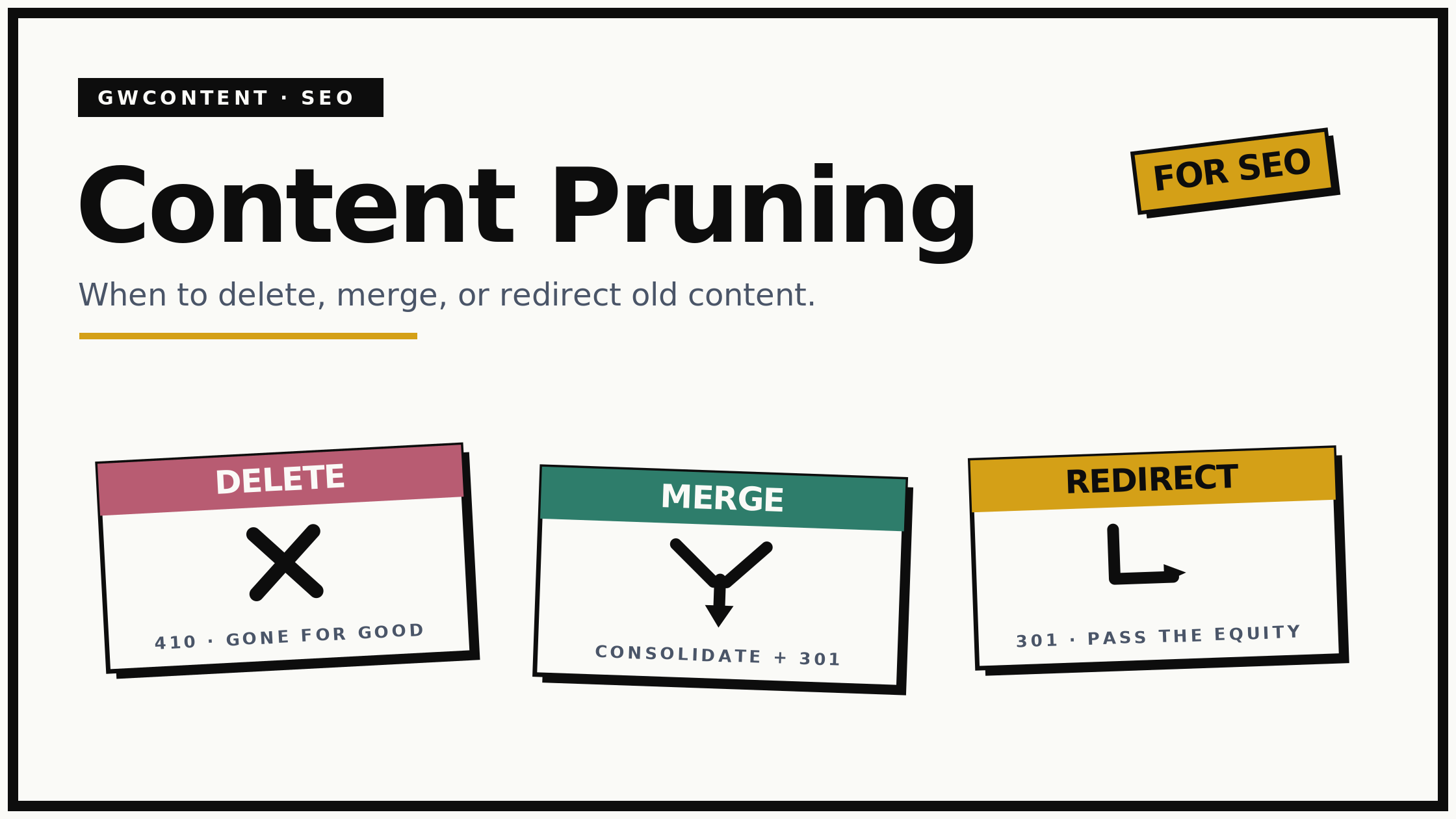
The question is almost never a binary "keep or delete". For every prune candidate, I run it through four possible actions. This is the framework I use on every content audit.
| Action | Use it when | What happens to the URL |
|---|---|---|
| Keep and improve | The page targets a valuable query but underperforms on quality, freshness, or word count | URL stays. Content is refreshed and brought up to date |
| Merge / consolidate | Multiple pages target the same topic or the same keywords and cannibalise each other | Best URL absorbs the others into consolidated content. Losers are 301 redirected |
| Redirect | The page has no standalone value but holds backlinks, or covers a topic better served elsewhere | 301 redirect to the most relevant page. Equity passes through |
| Delete (410) | The page is thin, has no traffic, no backlinks, no internal links, and no relevant redirect target | Removed. Returns 410. No equity to preserve |
The distinction between redirect and delete is the one people get wrong. If a page has any external links or sits on a topic you still cover, you 301 redirect it to the most relevant page so the equity flows somewhere useful. Per Google's guidance on consolidating duplicate URLs, a 301 is how you tell search engines which version is canonical. You only delete outright when there is genuinely nothing to preserve and nowhere sensible to send the user.
Merging is the highest-value action and the most work. When you have several blog posts on the same topic, the strongest one becomes the comprehensive overview, you fold the unique, valuable content from the others into it, and you redirect the old URLs to it. You end with one authoritative page instead of four competing ones, and you improve internal linking by pointing every related reference at a single target instead of scattering links across other pages.
My Content Pruning Process

This is the sequence I follow, and the order matters.
-
Audit the entire site. Export all the pages from Google Search Console and Google Analytics, run a crawl, and build one master sheet with every URL and its performance data side by side.
-
Segment by performance and intent. Flag low performing content, then group pages by the search intent and target keywords they address so cannibalisation between multiple pages becomes obvious.
-
Classify every candidate. Assign each page one of the four actions: keep and improve, merge, redirect, or delete. Document the reasoning so the decision is auditable later.
-
Execute carefully. Implement 301 redirects, consolidate content into the chosen target pages, update all internal links pointing at retired URLs, and refresh meta descriptions and on-page elements on the pages you keep.
-
Re-crawl and monitor. Submit updated sitemaps, request recrawls, and watch Google Search Console for eight to twelve weeks. Pruning is not instant. Search engines need to recrawl, process the redirects, and reassess the consolidated content before the gains show.
This is the core of what the content refresh programme delivers as an ongoing engagement, because pruning is not a one-time event. It is maintenance.
Mistakes to Avoid When Pruning Content
I have made some of these myself, which is how I know to warn against them.
Pruning on traffic alone. A page with no organic traffic might still earn qualified leads, carry backlinks, support a key conversion path, serve your target audience, or catch a seasonal spike. Look at the full picture before you delete content, not one number.
Deleting instead of redirecting. If you remove a page that has external links and let it 404, you bin the equity. Redirect it. Leaving broken links behind is one of the most common own goals in a rushed prune.
Pruning too aggressively, too fast. Cutting a third of your site in one week makes it almost impossible to diagnose what caused any ranking movement. Work in batches and watch the data between them.
Ignoring page type. Blog posts are the obvious candidates, but category pages, location pages, product pages, and landing pages all accumulate thin and duplicate variants. The framework applies to website content of every type, not just articles.
Treating it as one-and-done. Content decays continuously. A site that was pruned two years ago and never revisited is overdue. Pruning is maintenance, and it belongs in your routine alongside keyword research and link building.
The Bottom Line
If your organic traffic has plateaued despite steady publishing, the problem may not be that you have too little content. It may be that you have too much of the wrong kind. Start with the content decay detector to find pages quietly losing traffic, run the E-E-A-T score checker on anything you are unsure whether to keep or cut, and use the SEO ROI calculator to put a number on the recovered traffic before you commit.
Or get a free SEO audit and I will tell you directly which pages are dragging your site down and what the pruning upside looks like. For an ongoing programme that combines pruning, refreshing, and new content, the monthly SEO service covers the full engagement, with pruning sitting alongside the rest of my SEO services.
Frequently Asked Questions About Content Pruning
What is content pruning in SEO?
Content pruning is the process of systematically removing, merging, or redirecting low quality, outdated, or underperforming content to improve a website's SEO performance. By cutting thin and duplicate content and consolidating pages that target the same keywords, you free crawl budget, concentrate topical authority, and lift the overall quality signals search engines use to judge your entire site.
Does deleting content help SEO?
It can, when the content is genuinely low value. Deleting thin, outdated, or duplicate pages with no traffic, no backlinks, and no internal links pointing to them frees crawl budget and removes quality drag. But deleting valuable content, or content with external links, hurts you. The skill is in identifying which pages are dead weight and which are quietly contributing.
How often should I prune content?
For most sites, a full content audit every six to twelve months is sensible, with lighter checks each quarter using Google Search Console. Large sites publishing frequently benefit from continuous pruning built into the editorial process. The right cadence depends on how much you publish: the faster you add content, the faster low performing pages accumulate.
Should I delete, redirect, or noindex a page?
Delete (410) when the page has no traffic, no backlinks, and no relevant redirect target. Redirect (301) when it holds equity or covers a topic served better by another page, so that equity passes to the most relevant page. Noindex when you want to keep the page live for users but remove it from search, for example thin but necessary utility pages. Most prune candidates are redirects, not deletions.
How long does content pruning take to improve rankings?
Expect eight to twelve weeks for meaningful movement. Search engines need to recrawl the affected URLs, process the redirects, and reassess the consolidated content and your sitewide quality. Pruning is not a quick win in the way a title tag change can be. It is a structural improvement that compounds once search engines have caught up.
Can content pruning hurt my rankings?
Yes, if done carelessly. The common ways to damage rankings are deleting pages that hold backlinks without redirecting them, removing content that served a real user search intent, and pruning so aggressively that you cannot tell what caused any change. Done methodically, with a proper content audit and 301 redirects in place, the risk is low and the upside is high.
How do I identify low performing content to prune?
Triangulate three sources. Use Google Search Console for impressions, clicks, and position, Google Analytics for sessions and conversions, and a site audit crawl for duplicate content, thin content, orphan pages, and broken links. Flag pages with no search visibility, no engagement, and no links over the last twelve months. Never rely on a single metric to decide what to delete.